

【WordPress】画像軽量化とpreloadを試してもLCPが安定して下がらなかった記録|PSIモバイル測定の実例
この記事は、FUKABORI COLORSの実際の開発・検証記録をもとに、複数のAIツールを活用しながら構成・執筆しています。実際に行った作業や測定結果を記録し、改善できたことだけでなく、効果を確認できなかったことや、原因を特定できなかったことも含めて紹介しています。
WordPress(テーマはCocoon)のトップページを、PageSpeed Insights(PSI)のモバイルで測ったところ、パフォーマンスは58点、LCPは10.1秒でした。背景画像のpreload、画像の縮小とWebP化、フォント指定の整理、スライダーの画像出力の修正を行いました。
結果は、PSIが推定する画像の削減可能容量が約1,318 KiBから約960〜970 KiBに減った一方、LCPは7.2〜10.1秒の間で揺れ続け、安定した改善は確認できませんでした。同じ状態で測り直しても、点数が数十点動くこともありました。この記事は、何を調べ、何を直し、何が分からなかったかの記録です。
- LCPの対象は画像ではなく、CSSの背景画像だった
- 画像の推定削減量は約1,318 KiBから約961〜972 KiBに減少(PSIの推定値)
- LCPは7.2〜10.1秒の間で揺れ、安定した改善は確認できなかった
- 同じ状態の再測定でも、点数が31〜66点の範囲で動いた
- 保存しただけのコードは動かない。有効化とページソースでの出力確認が必要
1. 測定条件と最初の結果
PSIのモバイルで測定しました。画面の表記では、Moto G Power相当のエミュレーション、低速4Gのスロットリング、Lighthouse 13.5.0です。測定は何度も行い、時刻は測定ごとに異なります。
最初の測定(筆者の記録)は次のとおりです。
- パフォーマンス58、FCP 3.8秒、LCP 10.1秒、TBT 70ms、CLS 0.123
- 画像配信の改善:推定削減 約1,318 KiB
TBTは小さく、JavaScriptの処理よりも、表示が始まるまでの遅さが課題でした。
2. LCPの対象を特定する
PSIの「LCPリクエストの検出」を開くと、LCPの対象は画像ではなく div.entry-content.cf でした(図1)。ブラウザーの開発者ツールでこの要素を調べると、CSSの background-image に1200×1700pxのWebP(88.0 KB)が指定されていました(図2)。つまり、LCPの正体は背景画像でした。
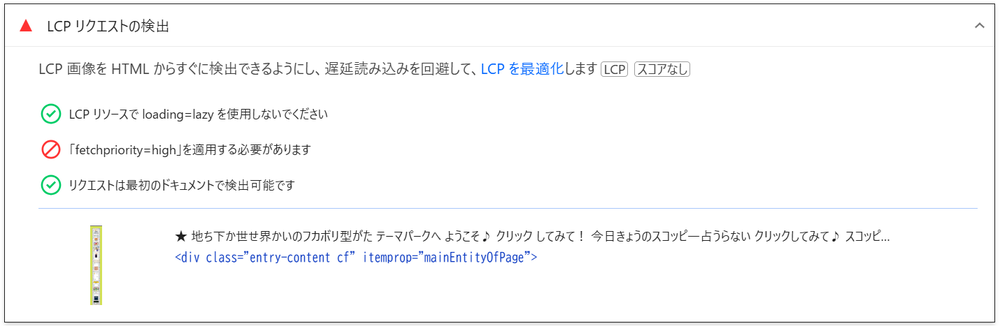
div.entry-content.cf が表示されている
div.entry-content.cf を調べた画面。background-image にURLが指定されている(URLは途中で切れている)最初の測定のLCP内訳(筆者の記録)は、読み込み開始までの遅延が約1,490ms、読み込み時間が約130ms、描画の遅延が約120msでした。ファイルは軽く、読み込み開始までの待ちが目立ちます。ただし、内訳の合計と見出しの10.1秒は一致しておらず、その理由は確認していません。
3. 画像を軽量化して差し替える
PSIの「画像配信の改善」には、表示サイズより大きな画像が並んでいました(図3)。たとえば、表示が約256×134pxの画像に1200×630pxのファイルが、表示が約192×105pxのロゴに1407×768pxのファイルが使われていました。カスタムHTMLに直接書いた <img> には、WordPressのメディアで自動生成される srcset が付かないため、元の大きな画像がそのまま配信されます。
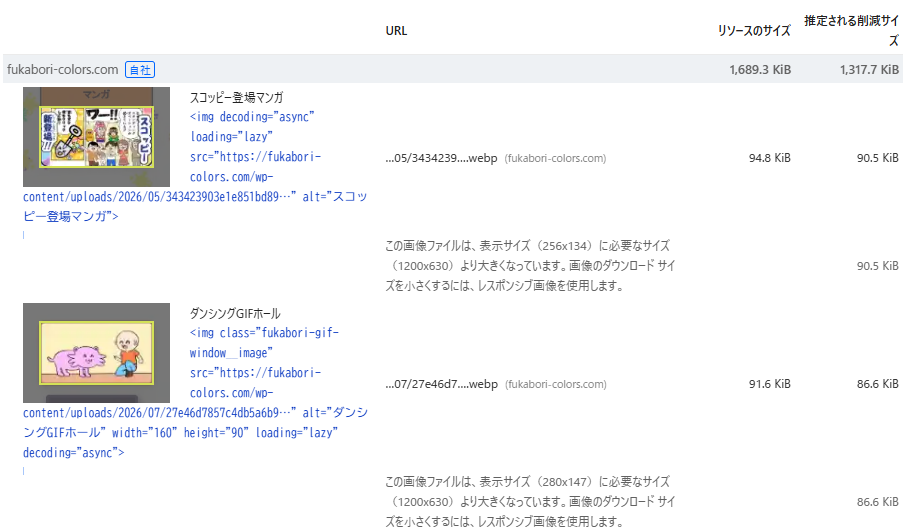
手順は次のとおりです。
- 元画像のURL(
-768x403などの派生ではなく、元のファイル)を保存する - Squoosh でリサイズする。幅は表示サイズの約2倍を目安にした
- 形式はWebP、品質は80前後にする
- メディアにアップロードし、HTML内のURLを新しいものに置き換える
- 古い画像は削除せず残し、戻せるようにする
まず、ロゴなど4枚を差し替えて測定し、その後、吹き出しとキャラクターの画像も差し替えました。
4. WordPressのコード修正と、つまずいたこと
4-1. 背景画像のpreload
背景画像はCSSを読み込んでから見つかるため、取得が遅れやすくなります。そこで、<head> で先読みを指示することにしました。最初はCocoonの「ヘッド用コード」欄に <link rel="preload"> を入れて保存しようとしましたが、403エラーで保存できませんでした。サーバーのセキュリティ機能(WAF)がHTMLタグを含む送信を止めた可能性を疑いましたが、切り分けておらず、原因は確定していません。
そこで、WPCodeのPHPスニペットに切り替えました。トップページ(固定ページ)にだけ出力する形です。
以下は設定例です。実際に使用する場合は、固定ページIDと画像URLを自分のサイトの値に置き換えてください。
add_action( 'wp_head', function () {
    if ( is_page( 123 ) ) { // 123は、トップページとして使っている固定ページのID
        echo '<link rel="preload" as="image" href="https://example.com/.../background.webp" fetchpriority="high">' . "\n";
    }
}, 1 );
つまずいた点: スニペットを保存して「有効化した」つもりでしたが、スニペット一覧では無効のままでした。ページソースを検索してもpreloadが見つからず、一覧を見直して気づきました。有効化した後は、ページソースに <link rel="preload"> が出力されたことを確認でき、PSIの「LCPリクエストの検出」で fetchpriority=high の項目も合格になりました。
教訓:コードを保存することと、有効化されて出力されることは別です。ページソースで出力を確認してください。
preload後のLCP内訳は、TTFB 230ms、読み込み開始までの遅延 1,280ms、読み込み時間 120ms、描画の遅延 550msでした。遅延は1,490msから1,280msへの減少にとどまり、読み込み開始までの待ちは大きくは縮みませんでした。
4-2. Googleフォントの重複読み込み
PSIの「ネットワークの依存関係ツリー」には、フォントファイル(woff2)が合計40個前後ぶら下がっていました(図4)。2本のCSSから読み込まれていました。
- ページ内のスタイルにあった
@import(Zen Maru Gothic、太さ900) - メモカードのプラグインが
wp_enqueue_styleで読み込む指定(Yuji Syuku、Zen Maru Gothic、Quicksand)
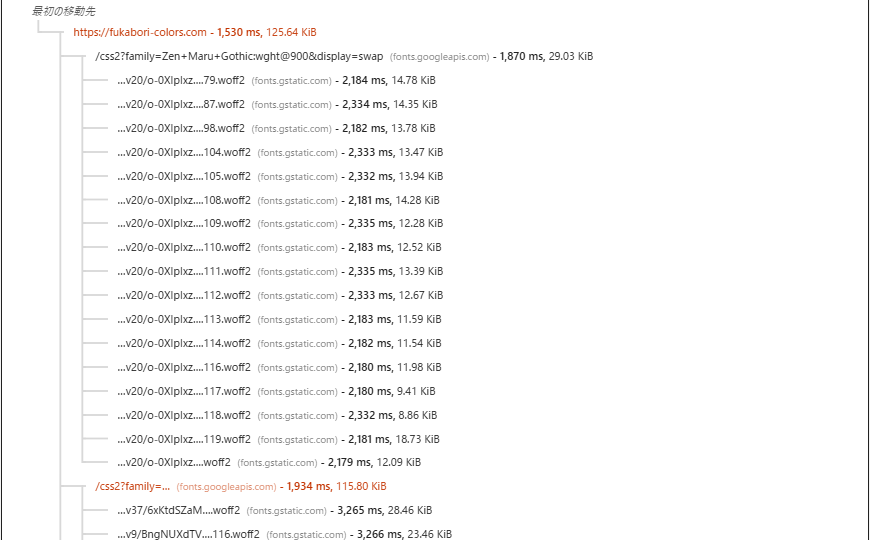
日本語のWebフォントは細かく分割されて配信されるため、指定が重なるとファイル数が増えます。プラグインのフォント指定を1行変更し、コード上で使用箇所が見つからなかった太さを減らしました。具体的には、Zen Maru Gothicを400・500・700から500・700に、Quicksandを400・500・600・700から600・700に絞りました。プラグインを更新すると元に戻る可能性があります。
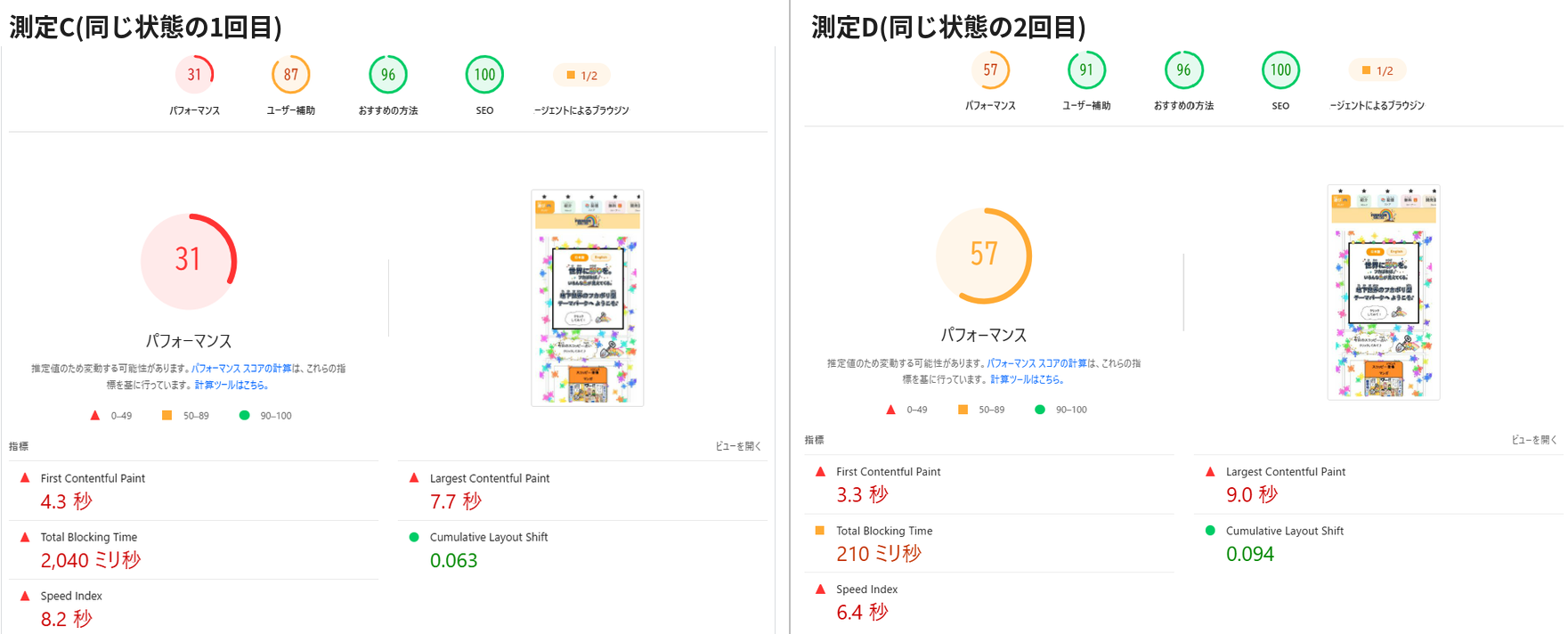
この変更の効果は判断できませんでした。同じ状態で測った2回の結果が、31点(TBT 2,040ms)と57点(TBT 210ms)と大きく離れていたためです。
つまずいた点: 後から、変更した1行のURLで、css2? と family= の間に空白が入っていることに気づきました。このURLが正しく読み込まれていたかは、確認していません(測定C〜Hは、この状態のものです)。メモカードの裏面の英字は普通に表示されていましたが、フォントが読み込めなくても、指定してある代替フォントで表示されるため、読み込めた証拠にはなりません。空白を取り除いて保存し直し、3回測り直しました(測定I〜K)。
教訓:URLを書き換えたら、開発者ツールのネットワークで、フォントのCSSが読み込めているか(ステータスが200か)を確認してください。
4-3. スライダーの画像出力
最新情報のスライダーは、PHPでWordPressの画像出力関数を呼び、サムネイルを並べています。PSIの「画像配信の改善」には、表示が約438×230pxなのに768×403pxの版が読み込まれているスライダー画像が複数枚含まれていました。
画像を出力するコードに、次の属性を追加しました。変更前は class と alt だけを指定していました。
echo wp_get_attachment_image($thumb_id, 'medium', false, [
    'class'         => 'f-new-img',
    'alt'           => esc_attr($title),
    'loading'       => 'lazy',
    'fetchpriority' => 'low',
    'decoding'      => 'async',
    'sizes'         => '(max-width: 850px) 90vw, 350px',
]);
loading="lazy" は画面外の画像の読み込みを後回しにし、sizes は表示幅に合う画像をブラウザーに選ばせる指定です。ただし、sizes の値は表示枠の実際の幅に合わせる必要があり、この修正でスライダーの読み込みがどう変わったかは、個別には確認していません。
4-4. 気づいたが、効果を確認できていない点
- 吹き出しの画像URLが
http://で書かれていました。https://に直せば余計なリダイレクトを避けられます。この修正は実施しましたが、効果は個別に検証していません。 - トップでは見えないアイキャッチ画像の
<img>に、fetchpriority="high"が付いて出力されていました。背景画像のpreloadと取得を競合させている可能性がありますが、検証していません。未対応です。
5. 測定結果
測定ごとに、その時点までに入れていた変更を並べました。
| 測定 | その時点までの変更 | スコア | FCP | LCP | TBT | CLS | 画像の推定削減 |
|---|---|---|---|---|---|---|---|
| A | なし(当初) | 58 | 3.8秒 | 10.1秒 | 70ms | 0.123 | 約1,318 KiB |
| B | preloadを追加 | 58 | 4.4秒 | 8.3秒 | 70ms | 0.102 | 1,324 KiB |
| C | フォント指定を変更 | 31 | 4.3秒 | 7.7秒 | 2,040ms | 0.063 | 1,325 KiB |
| D | 同上(再測定) | 57 | 3.3秒 | 9.0秒 | 210ms | 0.094 | 未記録 |
| E | 画像4枚を差し替え | 63 | 4.0秒 | 7.2秒 | 110ms | 0.005 | 1,137 KiB |
| F | 吹き出し・キャラ・スライダーを修正 | 47 | 未記録 | 未記録 | 未記録 | 未記録 | 未記録 |
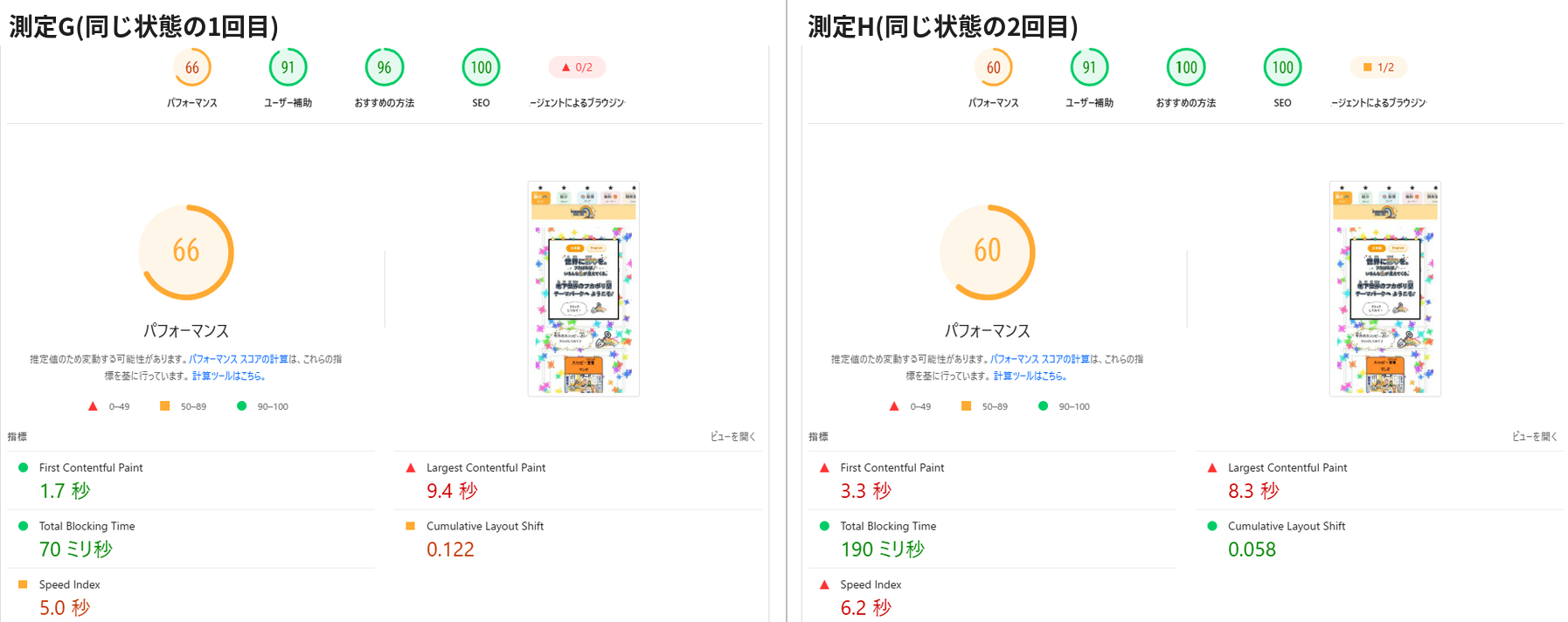
| G | 同上(再測定) | 66 | 1.7秒 | 9.4秒 | 70ms | 0.122 | 961 KiB |
| H | 同上(再測定) | 60 | 3.3秒 | 8.3秒 | 190ms | 0.058 | 972 KiB |
| I | フォントURLの空白を除去 | 60 | 3.3秒 | 8.2秒 | 150ms | 0.101 | 未記録 |
| J | 同上(再測定) | 57 | 1.9秒 | 7.4秒 | 510ms | 0.058 | 未記録 |
| K | 同上(再測定) | 57 | 4.0秒 | 8.0秒 | 80ms | 0.157 | 未記録 |
測定A・F・I・J・Kは、筆者の記録のみです。測定時刻は一定ではなく、この表は改善効果を証明するものではありません。
表から読み取れることは次のとおりです。
- 画像の推定削減量は、約1,318 KiBから約961〜972 KiBに減りました。PSIの推定値であり、実際の転送量が約350 KiB減ったという意味ではありません。
- LCPは7.2〜10.1秒の範囲で、一定の方向に動いていません。最後の3回(I〜K)は7.4〜8.2秒に収まりましたが、当初(A)は1回の記録しかないため、これを改善とは断定できません。
- 同じ状態の再測定でも、結果は大きく変わりました。CとDでは31点と57点、GとHでは66点と60点で、CLSも0.122と0.058でした。I〜Kでも57〜60点、TBTは80〜510ms、CLSは0.058〜0.157と揺れました。
点数が低かったCは、TBTが2,040msに跳ねたことが主因で、同じ状態のDでは210msに戻りました。1回の測定だけで、改善の成否は判断できません。
次の2組は、それぞれ同じ状態で続けて測った結果です(図5、図6)。
6. 画像を軽くしてもLCPが安定して改善しなかった理由
確認できた事実
- LCPの対象は背景画像で、ファイルは88 KB、読み込み時間は約120〜130msと短い
- LCP内訳で大きいのは、読み込み開始までの遅延だった(約1,490msから、preload後も約1,280ms)
- 画像の推定削減量が減っても、LCPは安定して縮まなかった
これらから、LCPの遅さの主因は背景画像のファイルサイズではない可能性が高いと考えています。ただし、原因は特定できていません。 次は、検証していない候補です。
- CSSやGoogleフォントがレンダリングをブロックしている(PSIは150〜510msの短縮余地と表示)
- 背景を
.entry-contentのCSS背景として指定していることによる、描画のタイミング - 非表示のアイキャッチ画像の
fetchpriority="high"との取得の競合 - 低速回線を想定した計算によるブレ
未実施の確認案として、背景画像を一時的に外して測る、フォントの読み込み方を変えて測る、といった1回に1つだけ変える実験が考えられます。複数の変更を重ねた今回の手順では、どの変更が効いたかを切り分けられませんでした。
7. 分かったこと・分からなかったこと
分かったこと
- LCPの対象は、「LCPリクエストの検出」と開発者ツールで特定できる(今回は背景画像)
- 表示サイズより大きすぎる画像は、PSIの一覧で見つけて軽量化できる
- コードを追加したら、保存だけでなく、有効化とページソースへの出力まで確認する必要がある
- PSIは同じ状態でも、点数やTBTが大きく揺れる
分からなかったこと
- LCPが安定して改善しない原因
- 実際の訪問者の体験が改善したか(フィールドデータなし)
- 各変更が、それぞれどれだけ効いたか
8. 作業を終了した理由
作業の前に、時間の上限(半日)を決めていました。画像の推定削減量は減り、TBTとSEOは良好でした。一方、LCPに残る候補は効果が読みにくく、1回の測定が信用できない以上、試行を重ねるほど時間がかかります。他の創作活動との兼ね合いも考え、今回はここで終えることにしました。LCPは、必要になったら、変更を1つずつ入れて複数回測る形で再挑戦します。
9. 同じ問題に取り組む人へのチェックリスト
- 1回の測定で判断せず、複数回測って揺れの幅を見る
- 「LCPリクエストの検出」で、LCPの対象を特定する
- LCPの対象が画像でないときは、CSSの背景画像を疑う
- 画像は表示サイズの約2倍を目安にリサイズし、WebPにする
- カスタムHTMLの画像に、
widthとheight、画面外の画像にloading="lazy"を付ける - LCPの対象の画像には
loading="lazy"を付けない - 追加したコードは、有効化されているかとページソースへの出力を確認する
- 依存関係ツリーで、Googleフォントの重複読み込みを確認する
- 書き換えたフォントのURLは、ネットワークで読み込めているか(ステータス200)を確認する
- 「推定削減量」と実際の転送量を区別する
- ラボデータと、フィールドデータを区別する
- 作業時間の上限と、終了する条件を最初に決める
WordPress Speed Optimization Log: Image Compression and Preload Didn't Stabilize LCP | A PageSpeed Insights Mobile Case Study
This article was structured and written with the help of several AI tools, based on the actual development and testing records of FUKABORI COLORS. It records the work that was actually done and the measurements taken, including what improved, what could not be confirmed, and what the cause remained unidentified for.
I measured the homepage of my WordPress site (theme: Cocoon) with PageSpeed Insights (PSI) on mobile and got a Performance score of 58 and an LCP of 10.1 seconds. I preloaded the background image, shrank images and converted them to WebP, tidied up the font settings, and changed how the slider outputs its images.
The result: PSI's estimate of potential image savings dropped from about 1,318 KiB to about 960–970 KiB, but LCP kept fluctuating between 7.2 and 10.1 seconds, and I could not confirm a stable improvement. Even re-measuring the same state could move the score by tens of points. This article is a record of what I investigated, what I changed, and what I still don't know.
- The LCP element was a CSS background image, not an
<img> - PSI's estimated image savings fell from about 1,318 KiB to about 961–972 KiB (an estimate, not measured transfer)
- LCP fluctuated between 7.2 and 10.1 seconds, with no stable improvement confirmed
- Even in the same state, scores ranged from 31 to 66
- Saved code does not run until it is activated; check the page source to confirm the output
- 1. Test Conditions and Initial Results
- 2. Identifying the LCP Element
- 3. Compressing and Replacing Images
- 4. WordPress Code Changes and the Pitfalls
- 5. Measurement Results
- 6. Why Lighter Images Did Not Stabilize LCP
- 7. What I Learned and What I Still Don't Know
- 8. Why I Stopped
- 9. A Checklist for Anyone Facing the Same Problem
1. Test Conditions and Initial Results
I measured with PSI on mobile. According to the report, the setup was a Moto G Power emulation, slow 4G throttling, and Lighthouse 13.5.0. I ran many measurements, and the time of each one differs.
The first measurement (my own record) was:
- Performance 58, FCP 3.8 s, LCP 10.1 s, TBT 70 ms, CLS 0.123
- Image delivery audit: estimated savings of about 1,318 KiB
TBT was low, so the problem was not JavaScript processing but how long it took for the page to start rendering.
2. Identifying the LCP Element
Opening PSI's "LCP request discovery" showed that the LCP element was not an image but div.entry-content.cf (Figure 1). Inspecting that element in the browser's developer tools revealed a 1200×1700 px WebP (88.0 KB) set as its CSS background-image (Figure 2). In other words, the LCP element was a background image.
div.entry-content.cf as the LCP element
div.entry-content.cf inspected in the developer tools. A URL is set in background-image (the URL is cut off)The LCP breakdown of the first measurement (my own record) was about 1,490 ms of resource load delay, about 130 ms of load time, and about 120 ms of element render delay. The file was light, and the wait before loading even began stood out. However, the sum of the breakdown does not match the headline 10.1 seconds, and I have not confirmed why.
3. Compressing and Replacing Images
PSI's "Improve image delivery" audit listed images far larger than their display size (Figure 3). For example, a 1200×630 px file was used for an image displayed at about 256×134 px, and a 1407×768 px file was used for a logo displayed at about 192×105 px. Images written directly into Custom HTML do not get the srcset that WordPress generates for media library images, so the original large file is served as is.
The steps were:
- Save the URL of the original image (the original file, not a derivative such as
-768x403) - Resize it in Squoosh. I used roughly twice the display width as a guide
- Use WebP at a quality of around 80
- Upload it to the media library and replace the URL in the HTML
- Keep the old images instead of deleting them, so the change can be reverted
I first replaced four images, including the logo, and measured. After that, I also replaced the speech-balloon and character images.
4. WordPress Code Changes and the Pitfalls
4-1. Preloading the background image
A background image is only discovered after the CSS has loaded, so it tends to be fetched late. I decided to instruct the browser to fetch it early in the <head>. I first tried to put a <link rel="preload"> into Cocoon's "Head code" field, but saving failed with a 403 error. I suspected the server's security feature (WAF) blocked a request containing HTML tags, but I did not isolate it, so the cause is not confirmed.
So I switched to a WPCode PHP snippet that outputs the tag only on the homepage (a static page).
The following is an example configuration. When you use it, replace the page ID and the image URL with the values for your own site.
add_action( 'wp_head', function () {
    if ( is_page( 123 ) ) { // 123 is the ID of the static page used as the homepage
        echo '<link rel="preload" as="image" href="https://example.com/.../background.webp" fetchpriority="high">' . "\n";
    }
}, 1 );
The pitfall: I thought I had saved and activated the snippet, but in the snippet list it was still inactive. Searching the page source found no preload, and I only noticed the problem when I looked at the list again. After activating it, I could confirm that the <link rel="preload"> appeared in the page source, and the fetchpriority=high item in PSI's "LCP request discovery" passed.
The lesson: saving code and having it activated and output are different things. Check the output in the page source.
After the preload, the LCP breakdown was TTFB 230 ms, resource load delay 1,280 ms, load time 120 ms, and render delay 550 ms. The delay only dropped from 1,490 ms to 1,280 ms, so the wait before loading did not shrink much.
4-2. Duplicate Google Fonts loading
PSI's "Network dependency tree" showed about 40 font files (woff2) hanging off two stylesheets (Figure 4).
- An
@importin an on-page style (Zen Maru Gothic, weight 900) - A font specification the memo-card plugin loads with
wp_enqueue_style(Yuji Syuku, Zen Maru Gothic, Quicksand)
Japanese web fonts are served split into many small pieces, so overlapping specifications multiply the number of files. I changed one line in the plugin's font specification and removed the weights for which I could not find any use in the code. Specifically, I reduced Zen Maru Gothic from 400/500/700 to 500/700, and Quicksand from 400/500/600/700 to 600/700. Updating the plugin may revert this change.
I could not judge the effect of this change. Two measurements of the same state came out far apart: 31 points (TBT 2,040 ms) and 57 points (TBT 210 ms).
The pitfall: Later I noticed that the URL on the line I had changed contained a space between css2? and family=. I have not confirmed whether that URL was loading correctly (measurements C–H were taken in this state). The English text on the back of the memo cards still displayed normally, but that is not proof the font loaded, because the browser falls back to the substitute font in the specification. I removed the space, saved again, and measured three more times (measurements I–K).
The lesson: after rewriting a URL, check in the developer tools' Network tab that the font CSS actually loads (status 200).
4-3. The slider's image output
The "latest updates" slider calls WordPress's image function in PHP and lines up the thumbnails. PSI's "Improve image delivery" included several slider images where a 768×403 version was loaded even though the display size was about 438×230.
I added the following attributes to the image output code. Before the change, only class and alt were specified.
echo wp_get_attachment_image($thumb_id, 'medium', false, [
    'class'         => 'f-new-img',
    'alt'           => esc_attr($title),
    'loading'       => 'lazy',
    'fetchpriority' => 'low',
    'decoding'      => 'async',
    'sizes'         => '(max-width: 850px) 90vw, 350px',
]);
loading="lazy" defers loading of off-screen images, and sizes tells the browser which image size suits the display width. Note that the sizes value has to match the actual width of the display area, and I have not separately confirmed how this change affected the slider's loading.
4-4. Things I noticed but could not confirm the effect of
- The speech-balloon image URLs were written with
http://. Changing them tohttps://avoids an unnecessary redirect. I made this change, but I have not verified its effect separately. - An
<img>for the featured image, which is not visible on the homepage, was output withfetchpriority="high". It may compete with the background image preload for fetch priority, but I have not verified that. I have not dealt with it.
5. Measurement Results
The table lists each measurement together with the changes in place at that point.
| Run | Changes up to that point | Score | FCP | LCP | TBT | CLS | Est. image savings |
|---|---|---|---|---|---|---|---|
| A | None (baseline) | 58 | 3.8 s | 10.1 s | 70 ms | 0.123 | ~1,318 KiB |
| B | Added preload | 58 | 4.4 s | 8.3 s | 70 ms | 0.102 | 1,324 KiB |
| C | Changed font specification | 31 | 4.3 s | 7.7 s | 2,040 ms | 0.063 | 1,325 KiB |
| D | Same (re-run) | 57 | 3.3 s | 9.0 s | 210 ms | 0.094 | Not recorded |
| E | Replaced 4 images | 63 | 4.0 s | 7.2 s | 110 ms | 0.005 | 1,137 KiB |
| F | Fixed balloons, characters, and slider | 47 | Not recorded | Not recorded | Not recorded | Not recorded | Not recorded |
| G | Same (re-run) | 66 | 1.7 s | 9.4 s | 70 ms | 0.122 | 961 KiB |
| H | Same (re-run) | 60 | 3.3 s | 8.3 s | 190 ms | 0.058 | 972 KiB |
| I | Removed the space in the font URL | 60 | 3.3 s | 8.2 s | 150 ms | 0.101 | Not recorded |
| J | Same (re-run) | 57 | 1.9 s | 7.4 s | 510 ms | 0.058 | Not recorded |
| K | Same (re-run) | 57 | 4.0 s | 8.0 s | 80 ms | 0.157 | Not recorded |
Runs A, F, I, J, and K are my own records only. The measurement times were not consistent, so this table does not prove the effect of any change.
Here is what the table shows:
- The estimated image savings dropped from about 1,318 KiB to about 961–972 KiB. This is PSI's estimate and does not mean the actual transfer size shrank by about 350 KiB.
- LCP ranged from 7.2 to 10.1 seconds and did not move in any consistent direction. The last three runs (I–K) stayed within 7.4–8.2 seconds, but the baseline (A) is only a single record, so I cannot call this an improvement.
- Even in the same state, results varied widely: 31 and 57 points for C and D, 66 and 60 points for G and H, with CLS at 0.122 and 0.058. Runs I–K also fluctuated: 57–60 points, TBT from 80 to 510 ms, and CLS from 0.058 to 0.157.
The low score in C was mainly caused by TBT jumping to 2,040 ms, which was back to 210 ms in D with the same state. A single measurement cannot tell you whether a change worked.
The next two pairs are results measured back to back in the same state (Figures 5 and 6).
6. Why Lighter Images Did Not Stabilize LCP
What I could confirm
- The LCP element was a background image whose file is 88 KB, with a short load time of about 120–130 ms
- The largest part of the LCP breakdown was the delay before loading started (about 1,490 ms, and still about 1,280 ms after the preload)
- Even as the estimated image savings fell, LCP did not shrink consistently
From this, I think the file size of the background image is probably not the main cause of the slow LCP. However, I have not identified the cause. The following are candidates I have not verified.
- CSS or Google Fonts blocking rendering (PSI shows a potential saving of 150–510 ms)
- Rendering timing caused by the background being set as a CSS background on
.entry-content - Competition for fetch priority with the hidden featured image's
fetchpriority="high" - Variability from the simulated slow-connection calculation
As an unperformed check, an experiment that changes only one thing at a time could be run: temporarily removing the background image, or changing how fonts are loaded, and measuring each. Because I stacked several changes in this process, I could not separate which change had which effect.
7. What I Learned and What I Still Don't Know
What I learned
- The LCP element can be identified with "LCP request discovery" and the developer tools (here, a background image)
- Images far larger than their display size can be found in PSI's list and compressed
- After adding code, you need to check not only that it is saved but also that it is activated and output in the page source
- PSI scores and TBT can swing widely even in the same state
What I still don't know
- Why LCP does not improve consistently
- Whether real visitors' experience improved (there is no field data)
- How much each individual change helped
8. Why I Stopped
Before starting, I set a time limit of half a day. The estimated image savings fell, and TBT and SEO were good. On the other hand, the remaining LCP candidates had unpredictable payoffs, and since a single measurement cannot be trusted, every extra attempt costs more time. Given my other creative work, I decided to stop here. If it becomes necessary, I will retry by making one change at a time and measuring several times.
9. A Checklist for Anyone Facing the Same Problem
- Don't judge from a single measurement; measure several times and look at the spread
- Identify the LCP element with "LCP request discovery"
- If the LCP element is not an image, suspect a CSS background image
- Resize images to about twice their display size and use WebP
- Give images in Custom HTML
widthandheight, and give off-screen imagesloading="lazy" - Don't put
loading="lazy"on the LCP image - After adding code, check that it is activated and output in the page source
- Check the dependency tree for duplicate Google Fonts loading
- After rewriting a font URL, confirm in the Network tab that it loads (status 200)
- Distinguish "estimated savings" from actual transfer size
- Distinguish lab data from field data
- Decide on a time limit and a stopping condition before you start


コメント