
WordPressで再利用可能なGIFウィジェットを実装|ショートコード化とテーマCSSによる表示崩れの修正
この記事は、FUKABORI COLORSの実際の開発内容をもとに、作業ごとに複数のAIツールを使い分けながら構成・執筆しています(試作:Gemini、共通パーツ化:ChatGPT、原因調査と他ページの表示修正:Claude)。
FUKABORI COLORSのトップページに、「Dancing GIF Hall」への入口となる小窓ウィジェットを追加しました。開閉式のドアの上にアニメーションGIFを表示し、一定間隔で画像を切り替え、クリックするとGIF一覧ページへ移動します。
この記事では、その実装の考え方と、途中でつまずいた2つの問題(本文に書いたPHPが動かない問題、他ページで表示がずれる問題)の解決を記録します。
- PHP・CSS・JavaScriptを分離し、ショートコードで再利用できる構成
- ランダム切り替え、連続表示の抑制、読み込みエラーへの対応
- 画面外・非表示タブでの不要な処理の抑制
- テーマや投稿ページのCSSに左右されない表示の固定方法
- CSSの更新が反映されないキャッシュ問題への対策
1. 開発の目的と要件
サイト内のGIFコンテンツを活用しながら、GIF一覧ページへの入口を目に留まりやすくすることが目的です。要件は次のとおりです。
- WordPressに登録された公開済みのGIFを表示対象にする
- 約10秒ごとにランダムで切り替え、同じ画像の連続表示をできるだけ避ける
- 小窓全体をクリックできるリンクにし、リンク先をGIF一覧ページに統一する
- スマートフォンでは表示サイズを調整する
- トップページ専用にせず、ほかのページにも短い記述で設置できるようにする
- 画面外や非表示タブでの不要な処理を抑える
- 画像の読み込み失敗に備えて代替表示を用意する
2. 最初のつまずき:本文に書いたPHPは実行されない
最初の試作はGeminiで作成しました。GIF一覧を取得するPHPを、トップページ本文のHTMLに貼ったスクリプトの中へ直接書く構成でした。ただ、そのコードは貼り付け先がWordPressの固定ページ本文であることを前提にしておらず、本文ではPHPが実行されないというWordPress側の仕組みとぶつかりました。コードを貼る先の条件が伝わっていないと、どのツールでも起こりうるすれ違いです。
結果として、小窓の枠は表示されるのに中身は黒いままでした。ブラウザーの開発者ツールで確認すると、画像要素の src が最初のプレースホルダーのまま変わっていませんでした。
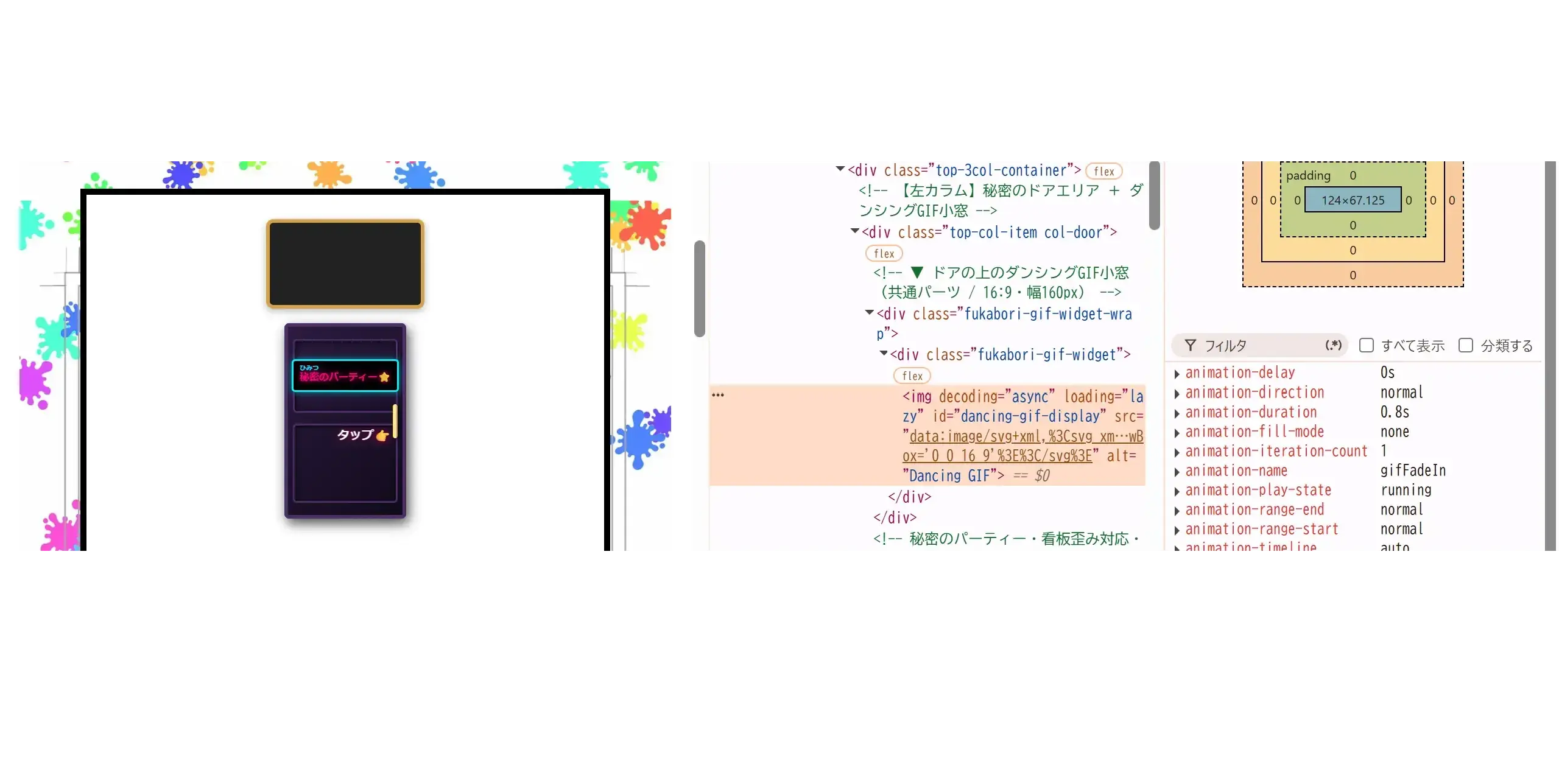
img の src がプレースホルダー(data:image/svg+xml…)のままになっているブラウザーのコンソールにも、次のエラーが出ていました。
Uncaught SyntaxError: Unexpected token '<'
原因は、固定ページの本文に書いた <?php ... ?> をWordPressが実行しないことでした。PHPはそのままブラウザーに届き、JavaScriptが < を解釈できずに停止していたのです。PHPが実行されるのは、テーマのPHPファイルやプラグインなど、WordPress側のコードだけです。
そこで、PHPの処理をWordPress側のファイルに移し、本文からはショートコードで呼び出す方針に切り替えました。
3. 実装構成とショートコード化
ウィジェットは、PHP・CSS・JavaScriptの3つに役割を分けています。
- PHP:GIFデータの取得、HTMLの生成、CSSとJavaScriptの読み込み。ウィジェットごとに一意のIDを発行し、1ページに複数置いても衝突しないようにしています。
- CSS:窓のサイズ、縦横比、枠線、画像の表示方法、スマートフォン向けの幅調整。
- JavaScript:画像の切り替え、読み込みエラーへの対応、画面内・タブ表示の判定。
デザインを直したいときはCSS、動作を直したいときはJavaScript、取得するデータを変えたいときはPHPを見ればよい構成です。
呼び出しにはWordPressのショートコードを使い、設置先には次の1行を書くだけにしました。
[gif-window]
HTMLやJavaScriptを各ページに複製しないため、修正は共通ファイル1か所で済み、設置ページを増やすのも簡単です。CSSとJavaScriptも外部ファイルにして、ページ本文に長いスクリプトを埋め込まないようにしました。
ただし、ショートコードはWordPressが処理する場所に書く必要があります。カスタムHTMLブロックなどでは、文字列のまま表示される場合があります。逆に、この記事のように「ショートコードそのものを文字として見せたい」場合は、角括弧をHTMLエンティティ([ と ])で書かないと、実行されて小窓が出てしまいます。
4. WordPressからGIFデータを取得する
GIFの管理は、WordPressに登録したカスタム投稿を使っています。公開済みの投稿だけを管理画面の並び順どおりに取得し、各投稿に関連付けられた画像のURLを集めます。
この方式なら、GIFの追加や整理を管理画面で行えて、画像URLを表示コードに一つずつ書く必要がありません。取得したURLはJSONにしてHTML属性へ格納し、JavaScriptから読み取ります。出力時には、出力先に合ったエスケープ処理をしています。
なお、投稿が公開されていても、画像ファイルが削除されていたり取得できなかったりする場合があります。そのため、画像が存在する前提にはせず、次の7章で述べるエラー処理を組み込んでいます。
5. ランダム切り替えと連続表示の抑制
表示画像は約10秒ごとに、候補の中からランダムに選びます。ただ毎回ランダムに選ぶだけでは同じ画像が続くことがあるため、直前に表示した画像を記録し、次の候補から除外しています。
表示できる画像が1枚しかない場合は別の画像を選べないので、この処理が効くのは複数枚あるときだけです。また、読み込みに失敗した画像も候補から外し、使えない画像を繰り返し表示しようとしないようにしています。
6. 画面外・非表示タブでの処理制御
タイマーで画像を切り替えるウィジェットは、見られていない間も動き続けてしまいます。そこで、次の2つの条件が両方そろったときだけ切り替えるようにしました。
- 画面内にあること:Intersection Observerで、ウィジェットが表示領域に入っているかを監視します。スクロールイベントで位置を計算し続けるのではなく、ブラウザーからの通知を受け取る方式です。画面外ではタイマーを止め、戻ってきたら再開します。
- タブが表示されていること:Page Visibility APIで、別のタブを見ている間は処理を止めます。
これは不要なタイマー処理を減らすための工夫です。CPU使用量やバッテリー消費にどの程度の差が出るかは、端末やブラウザーによって異なり、今回は計測していません。
7. 画像エラーと代替表示
ネットワークの状態やファイルの欠落で画像が読み込めないと、窓が空のままになります。そこで、読み込みエラーを検知したら代替画像(Dancing GIF Hallのサムネイル)を表示し、失敗した画像は候補から除外します。これにより、窓の表示領域と一覧ページへのリンクを保ったままにできます。
代替画像そのものが取得できなければ、この対策は効きません。運用時には代替画像のURLが有効かも確認が必要です。
8. 他ページで窓とGIFの四隅がずれた問題
症状
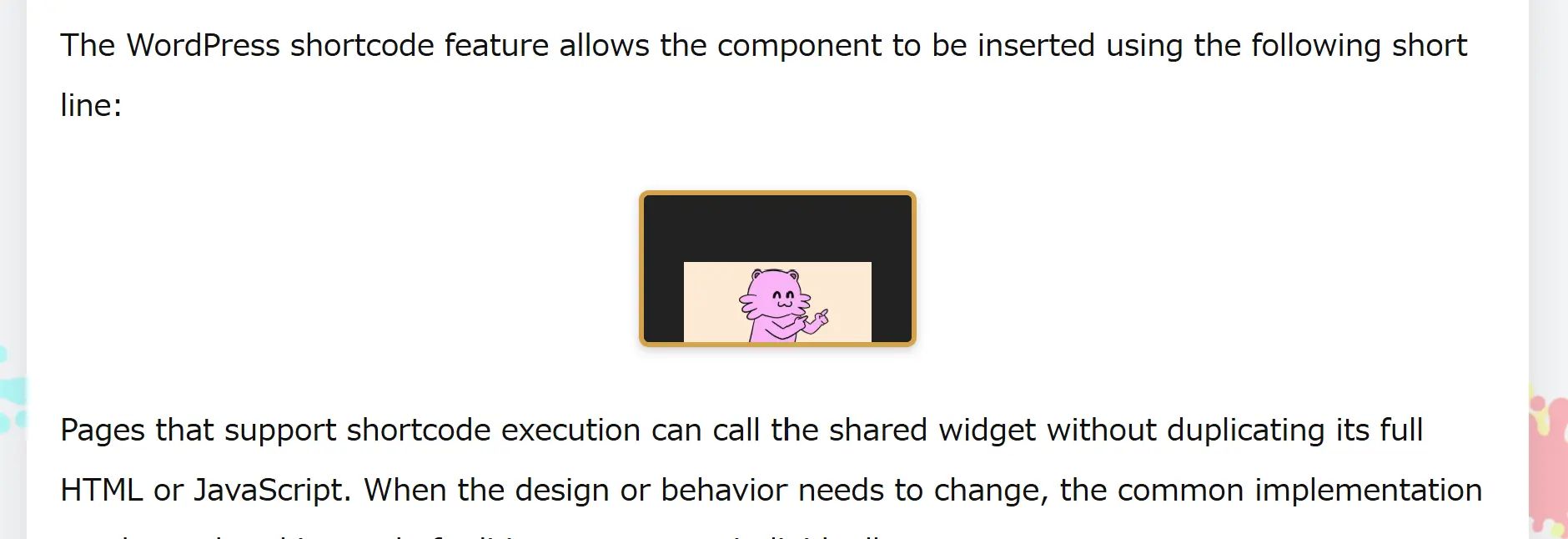
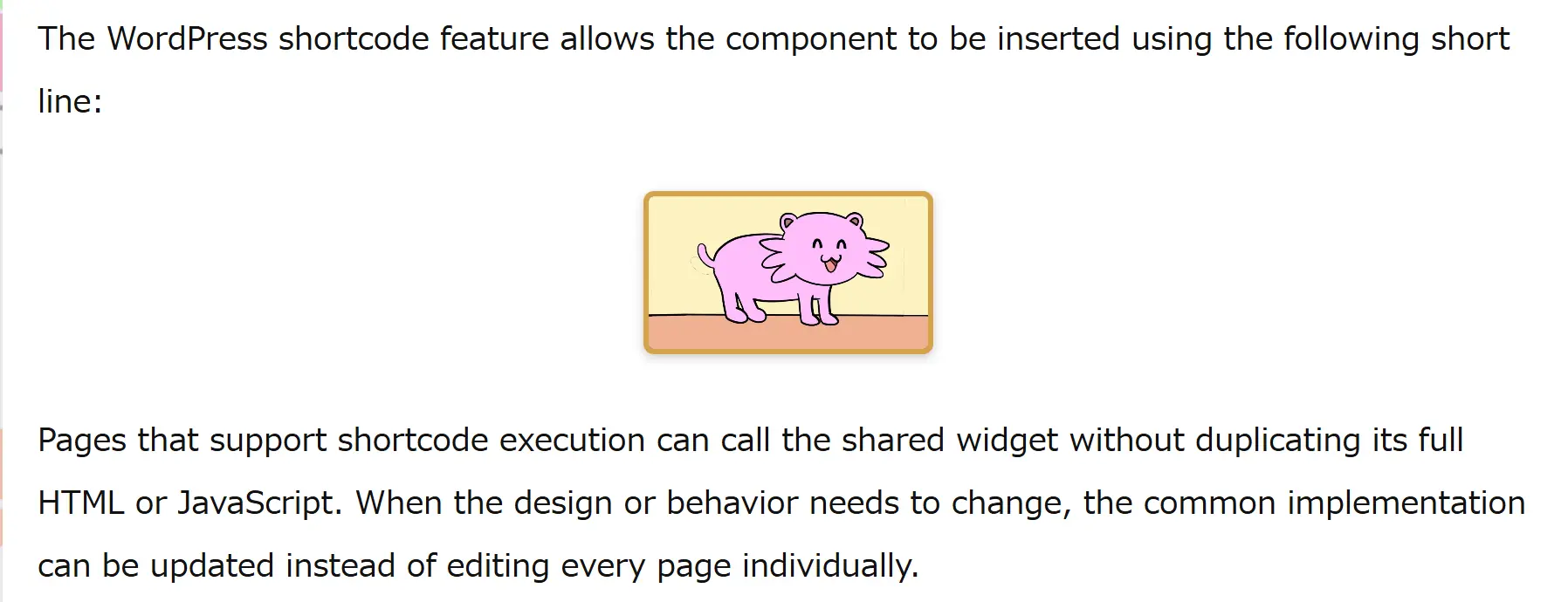
トップページでは問題なく表示されたものの、ほかのページにショートコードを置くと、窓の四隅とGIF画像の四隅が合わなくなりました。画像が窓いっぱいに広がらず、小さいまま下寄せ・中央寄せで表示されていました。
最初の対処と、引き継ぎ
最初に試したのは、画像の object-fit を contain から cover に変えることでしたが、見た目は変わりませんでした。この時点でChatGPTの無料利用枠が上限に達したため、残りの調査と修正はClaudeに引き継ぎ、CSSとPHPファイルを修正しました。
原因の見立て
トップページでは正常で、投稿ページだけがずれることから、投稿ページ側のテーマCSSが画像の width・height・max-width などに干渉している可能性が高いと考えました。本文内の画像に対する汎用スタイルは、トップページには効かず、投稿ページにだけ効くことがあるためです。実際にどのルールが原因だったかまでは特定していません。特定を待たず、テーマに左右されにくい作りに直す方針にしました。
cover に変えても直らなかった理由は2つ考えられました。
- 元のCSSは詳細度が低く
!importantもないため、テーマ側の指定が優先された。 - CSSの読み込みURLに付けるバージョン番号が固定だったため、ファイルを書き換えてもブラウザーやキャッシュに古いCSSが残った。
修正内容
修正はCSSとPHPの2ファイルで、JavaScriptは変更していません。
- 画像を
position: absoluteで窓の内側いっぱいに固定し、テーマのheight: autoなどに左右されにくくする。 - セレクタを
.fukabori-gif-window-wrap配下に絞って詳細度を上げ、!importantを付ける。 - テーマが付けがちな
max-width、余白、枠線、角丸、影、transform、floatを画像側で打ち消す。 - CSSとJavaScriptのバージョン番号を、ファイルの更新日時から自動生成する。
CSSの要点(抜粋・簡略化)は次のとおりです。
.fukabori-gif-window-wrap .fukabori-gif-window {
    position: relative !important;
    aspect-ratio: 16 / 9 !important;
    overflow: hidden !important;
}

.fukabori-gif-window-wrap .fukabori-gif-window .fukabori-gif-window__image {
    position: absolute !important;
    top: 0 !important; left: 0 !important;
    right: 0 !important; bottom: 0 !important;
    width: 100% !important;
    height: 100% !important;
    max-width: none !important;
    margin: 0 !important;
    transform: none !important;
    object-fit: cover !important;
}
PHP側では、固定の '1.0.0' をやめ、filemtime() の値をバージョンとして渡すようにしました。
$css_ver = file_exists($asset_path . 'gif-window.css')
    ? filemtime($asset_path . 'gif-window.css') : '1.0.1';

wp_enqueue_style('fukabori-gif-window', $asset_url . 'gif-window.css', array(), $css_ver);
これで、CSSを書き換えるたびにURLが変わり、キャッシュに古いファイルが残りにくくなります。あわせて、アセットのURLに / が二重に入っていた箇所も直しました。
残る注意点
object-fit: cover は窓いっぱいに表示する代わりに、GIFが16:9でなければ上下か左右が少し切れます。全体を見せたい場合は contain にできますが、余った部分に窓の背景色が見えます。どちらでも、窓の四隅は枠に合います。
また、!important を多用する方法は、テーマに対抗する手段としては強力ですが、後から上書きしにくくなります。このウィジェット専用のクラス名の範囲に限って使うのは、そのための割り切りです。
9. レスポンシブ対応と表示速度
画面幅が狭いときはメディアクエリで窓の幅を縮め、縦横比を固定して形が崩れないようにしています。
表示速度には、画像の容量だけでなく、読み込みのタイミング、アニメーションのデコード、JavaScriptの実行頻度が関わります。このため、次の点を意識しています。
- 必要以上に大きな画像を使わない
- 画面外と非表示タブでは切り替えを止める
- CSSとJavaScriptを共通ファイルで管理する
画像には遅延読み込みと非同期デコードの属性を付けていますが、常に速くなるとは限りません。ファーストビュー内の画像では遅延読み込みが表示開始を遅らせることがあり、GIFは静止画より描画の負荷も高くなりがちです。設置位置に応じて、計測しながら判断する必要があります。
10. 保守性とセキュリティ
基本方針は次のとおりです。
- HTML属性へ出力する値は、出力先に合ったエスケープ処理をする
- JavaScriptへ渡すデータはJSONで出力する
- 表示対象を公開済みの投稿に限定する
- 同じ処理を各ページに重複して書かない
これらは基本的な配慮であり、サイト全体の安全性を保証するものではありません。WordPress本体、テーマ、プラグインの継続的な更新と検証が必要です。なお、この開発記録では、サーバー内部の情報や管理用の情報は載せていません。
11. 動作確認と今後の検証
トップページに加え、投稿ページでも四隅が一致して表示されることを確認できました。今後は、次の点を確認していきます。
- 別のテーマや、ほかの種類のページ(固定ページ、投稿、アーカイブなど)でも表示が崩れないか
- GIFが10秒ごとに切り替わり、同じ画像が連続しにくいか
- スマートフォンでのレイアウトと、読み込み失敗時の代替表示
- 画面外と非表示タブで、切り替え処理が止まっているか
パフォーマンスはPageSpeed Insightsなどで、追加前後の条件をそろえて測定します。現時点の工夫は設計上の対策であり、計測で確かめられた速度改善ではありません。
おわりに
WordPressに登録したGIFを使い、ショートコードで呼び出せるウィジェットを実装しました。途中で、本文に書いたPHPが実行されない問題と、他ページで表示がずれる問題に当たり、前者は処理をWordPress側へ移すことで、後者は表示をCSSで固定することで解決しました。
AIツールの利用枠が切れて別のAIに引き継ぐこともありましたが、コードとエラーの内容を共有すれば、調査と修正をそのまま続けられました。FUKABORI COLORSでは、こうした小さな機能を積み重ねながら、サイト内を探索する楽しさを広げていきます。
Building a Reusable GIF Widget in WordPress: Shortcodes and Fixing Theme CSS Conflicts
This article was structured and written with the help of several AI tools, each used for different parts of the work (prototype: Gemini; shared component: ChatGPT; root-cause investigation and cross-page display fix: Claude), based on the actual development work carried out for FUKABORI COLORS.
I added a small GIF window to the FUKABORI COLORS homepage as an entry point to the Dancing GIF Hall. It sits above the interactive door, rotates through animated GIFs at regular intervals, and links to the GIF gallery when clicked.
This article records the design and two problems I ran into along the way: PHP written in page content that never ran, and a layout that broke on pages other than the homepage.
- A PHP/CSS/JavaScript structure reusable through a shortcode
- Random rotation, repeat avoidance, and error handling
- Reducing unnecessary work when off-screen or in a hidden tab
- Making the layout independent of theme and post-page CSS
- Avoiding stale CSS caused by fixed version numbers
- 1. Goals and Requirements
- 2. The First Pitfall: PHP in Page Content Does Not Run
- 3. Structure and the Shortcode
- 4. Retrieving GIF Data from WordPress
- 5. Random Rotation and Repeat Avoidance
- 6. Controlling Updates Based on Visibility
- 7. Image Errors and Fallback Display
- 8. Corner Misalignment on Other Pages
- 9. Responsive Design and Performance
- 10. Maintainability and Security
- 11. Testing and Further Validation
- Conclusion
1. Goals and Requirements
The goal was to make the entrance to the GIF gallery more noticeable while reusing animated content already published on the site. The requirements were:
- Use published GIF content registered in WordPress
- Rotate images at roughly ten-second intervals, avoiding consecutive repeats where possible
- Make the whole widget a link to the gallery page
- Adjust the size on smaller screens
- Make it reusable on other pages with a short snippet, not a homepage-only effect
- Reduce unnecessary work when the widget is off-screen or its tab is hidden
- Provide a fallback when an image cannot be loaded
2. The First Pitfall: PHP in Page Content Does Not Run
The first prototype was built with Gemini. It put the PHP that fetches the GIF list directly inside a script pasted into the homepage content. That code did not assume it would be pasted into WordPress page content, where PHP is not executed, so it collided with how WordPress works. This kind of mismatch can happen with any tool when the conditions of the destination are not communicated.
As a result, the window frame appeared but its content stayed black. In the browser's developer tools, the image element's src was still the initial placeholder.
img still has its placeholder src (data:image/svg+xml…)The browser console also reported:
Uncaught SyntaxError: Unexpected token '<'
The cause was that WordPress does not execute <?php ... ?> written in page content. The raw PHP reached the browser, and the JavaScript parser stopped at the <. PHP only runs in WordPress-side code such as theme files and plugins.
I moved the logic into a WordPress-side file and switched to calling it from content through a shortcode.
3. Structure and the Shortcode
The widget splits its responsibilities across PHP, CSS, and JavaScript.
- PHP: retrieves the GIF data, generates the markup, and loads the CSS and JavaScript. Each instance gets a unique ID, so several widgets can coexist on one page.
- CSS: window size, aspect ratio, border, image presentation, and narrow-screen widths.
- JavaScript: image rotation, error handling, and viewport and tab visibility checks.
Design changes mostly touch CSS, behavior changes JavaScript, and data changes PHP.
The component is called with a WordPress shortcode, so a page only needs this one line:
[gif-window]
Because HTML and JavaScript are not duplicated across pages, a change in the shared files applies everywhere, and adding the widget to another page is trivial. CSS and JavaScript live in external files rather than as a long script embedded in page content.
The shortcode has to be placed where WordPress processes shortcodes; in some blocks, such as Custom HTML, it may appear as literal text. Conversely, to display the shortcode as text in an article like this one, the square brackets must be written as HTML entities ([ and ]), or WordPress will execute it and render the widget instead.
4. Retrieving GIF Data from WordPress
GIFs are managed as a custom post type in WordPress. The widget fetches only published posts, in the order set in the admin screen, and collects the image URL associated with each one.
This lets GIFs be added and organized from the admin screen without hard-coding URLs. The URLs are encoded as JSON, stored in an HTML attribute, and read by JavaScript, with output escaped for its context.
A published post can still point to a deleted or unavailable file, so the code does not assume every image will load; the error handling in section 7 covers that case.
5. Random Rotation and Repeat Avoidance
Every ten seconds or so, the widget picks the next image at random. Since pure randomness can show the same image twice in a row, it remembers the last image and excludes it from the next pick.
This only helps when several images are available; with a single image there is nothing else to choose. Images that failed to load are also excluded, so the widget does not keep retrying an unavailable file.
6. Controlling Updates Based on Visibility
A timer-driven widget keeps running even when nobody is looking at it. The widget rotates images only when both conditions below are met:
- It is in the viewport: the Intersection Observer API reports when the widget enters or leaves the visible area, instead of recalculating its position on every scroll event. The timer stops while it is off-screen and resumes when it returns.
- The tab is visible: the Page Visibility API pauses rotation while the user is on another tab.
These measures reduce unnecessary timer activity. How much CPU or battery they save depends on the device and browser, and I have not measured it.
7. Image Errors and Fallback Display
Network problems or missing files can leave the window empty. When an image fails to load, the widget shows a fallback (a Dancing GIF Hall thumbnail) and excludes the failed image from future picks. The window area and the link to the gallery are preserved.
If the fallback image itself is unavailable, this does not help, so its URL should be checked during maintenance too.
8. Corner Misalignment on Other Pages
Symptom
The homepage rendered correctly, but when the shortcode was placed on other pages, the corners of the GIF no longer matched the corners of the window. The image did not fill the window and sat small, centered, and pushed toward the bottom.
First attempt and the handover
My first attempt was changing the image's object-fit from contain to cover, which made no visible difference. At this point ChatGPT's free usage limit was reached, so I handed the remaining investigation and fixes to Claude, which revised the CSS and PHP files.
Likely cause
Because the homepage was fine and only post pages broke, the likeliest explanation was that the theme's CSS for post content was interfering with the image's width, height, or max-width. Generic styles for images in content can apply to posts but not to the homepage. I did not identify the exact rule responsible; instead I chose to harden the widget so that it depends less on the theme.
There were two likely reasons the cover change had no effect:
- The original CSS had low specificity and no
!important, so theme rules won. - The stylesheet URL used a fixed version number, so browsers and caches kept serving the old CSS after the file changed.
The fix
The fix touched the CSS and PHP files; the JavaScript was unchanged.
- Pin the image to the inside of the window with
position: absolute, so theme rules likeheight: automatter less. - Scope selectors under
.fukabori-gif-window-wrapto raise specificity, and add!important. - Cancel properties that themes commonly set on images:
max-width, margins, borders, radius, shadows,transform, andfloat. - Generate the CSS and JavaScript version numbers from each file's modification time.
The key CSS, excerpted and simplified:
.fukabori-gif-window-wrap .fukabori-gif-window {
    position: relative !important;
    aspect-ratio: 16 / 9 !important;
    overflow: hidden !important;
}

.fukabori-gif-window-wrap .fukabori-gif-window .fukabori-gif-window__image {
    position: absolute !important;
    top: 0 !important; left: 0 !important;
    right: 0 !important; bottom: 0 !important;
    width: 100% !important;
    height: 100% !important;
    max-width: none !important;
    margin: 0 !important;
    transform: none !important;
    object-fit: cover !important;
}
On the PHP side, the fixed '1.0.0' was replaced with the value of filemtime():
$css_ver = file_exists($asset_path . 'gif-window.css')
    ? filemtime($asset_path . 'gif-window.css') : '1.0.1';

wp_enqueue_style('fukabori-gif-window', $asset_url . 'gif-window.css', array(), $css_ver);
Now the URL changes whenever the CSS file changes, so stale copies are less likely to linger. I also fixed a doubled slash in the asset URL.
Remaining caveats
object-fit: cover fills the window but crops the top and bottom, or the sides, of any GIF that is not 16:9. Switching to contain shows the whole image at the cost of visible window background; either way, the window's corners match its frame.
Heavy use of !important is a strong way to resist theme CSS, but it makes later overrides harder. Limiting it to this widget's own class names is a deliberate trade-off.
9. Responsive Design and Performance
Media queries reduce the window width on narrow screens, and a fixed aspect ratio keeps its shape stable.
Performance depends on more than file size: loading timing, animation decoding, and JavaScript frequency all matter. I therefore:
- avoid unnecessarily large images,
- pause rotation off-screen and in hidden tabs, and
- manage CSS and JavaScript as shared files.
The image uses lazy-loading and async-decoding attributes, but they do not always help. In the initial viewport, lazy loading can delay the first paint, and animated GIFs can cost more to decode and render than static images. Decisions should be based on the actual placement and measurements.
10. Maintainability and Security
The basic principles are:
- Escape values according to their HTML output context
- Pass data to JavaScript as JSON
- Limit the source to published posts
- Avoid duplicating logic across pages
These are basic safeguards, not a guarantee of site-wide security; WordPress core, the theme, and plugins still need ongoing updates and validation. This record also leaves out server-internal and administrative details.
11. Testing and Further Validation
Beyond the homepage, I confirmed that the window and image corners now match on a post page. Next I plan to check:
- Whether the layout holds with other themes and other page types (pages, posts, archives)
- That GIFs rotate every ten seconds with fewer consecutive repeats
- Mobile layout and fallback behavior on load failure
- That rotation actually stops off-screen and in hidden tabs
Performance will be measured with tools such as PageSpeed Insights, under comparable conditions before and after. The measures described here are design intentions, not measured speed improvements.
Conclusion
I built a reusable WordPress widget that pulls registered GIFs and can be inserted with a shortcode. Along the way, I resolved PHP that never ran in page content by moving the logic to the WordPress side, and fixed a layout that broke on other pages by pinning the display with CSS.
Handing the work from one AI tool to another after a usage limit was not a problem: sharing the code and the error details was enough to continue. FUKABORI COLORS will keep growing through small, practical features that make the site a place to explore.

コメント